HackTown
Cyber Criminal University - Home

You are not logged in. You will only be able to access the courses in GREEN from the course list.
Chapter 3 - Getting caught up
Malicious Microsoft documents have been in the hacker wheelhouse for quite some time until Microsoft patched that hole. In the past most malware was delivered by web drive-by download attacks but thanks to improvements in modern web browsers, sandboxing techniques, and a huge reduction of bugs in web browsers it's more difficult than ever to rely on such attacks. The harsh reality is that the cost and technical skill needed to create any type of browser exploit is not in reach for your "average" attacker (IE: you and me).
This course will not focus on such concepts because the reality is, you're never going to design a Remote Code Execution (RCE) or any type of browser exploit for anything so get over it.
Or maybe you will. Who the fuck knows?
Anyways, we're going to focus on educating you on the structure of Word documents, tools and techniques, and the delivery methods for compromising your targets with malicious documents.
Remember, don't aim to be elite hacker status but strive to the best of your abilities whatever that may be. You're not going to be the most elite hacker or expert programmer and that's OK because all you need to do is learn hacker techniques and tradecraft in specific areas. Focus on specific items of interest which will give you a great foundation to build on. Then you can work your way up from that and accomplish whatever the fuck it is you're trying to accomplish. There's no point in re-inventing the wheel when some of the best hacker tools are open source and are available now. Use them! I think it's very important to be using the right tools and to enhance on that skill set eventually getting to a skill level where you're able to play around with source code.
For example, friends. If you're wondering how malware takes control over a computer and is able to take screenshots of the target's Desktop there are plenty of malware examples on GitHub in any programming language you're looking to learn it in. Learning from other people's code will help you!
You can learn from other people's code, modify, and patch together your own Frankenstein piece of custom malware for anything you can imagine. You see I didn't need to go master learning C/C++ or Python in and out I just needed to focus in on the things I cared about and I learned those specifically.
I wanted to learn from other people's malware to help develop my own way of programming malware. If that makes any sense. When the ZeuS banking trojan source code got leaked online I was able to learn a lot from that. Many did others did. No different than Conti ransomware source code being leaked today and how you can learn from their code.
Look at it this way... If someone gets an A+ on an essay and you decide to copy their essay word for word this is known as plagiarizing yes? However, if you paraphrase the whole essay you'll get the same point across and this is OK!
I do this for the malware that is leaked online. If I plagiarized their code it would be flagged by AV since it's a well known piece of malware right? However, if I paraphrase the whole code while adding a little something of my own I have my own Frankenstein piece of malware that will bypass Anti-Virus. Why would you re-invent the wheel when there is perfect malware available on GitHub for you to modify and take over the world with? I mean come on! You don't need to invest a lot of time into learning a little bit of XYZ programming knowledge. Let's go mans nothing is going to land in your lap. Work for it.
Getting a decent RAT to infect people with is always a hurdle most people encounter when they're "new" to the game. You'll find that RATs are available everywhere either for sale or to download. They all come in different shapes and sizes. Search for "spy on my spouse's computer" in Google and see what comes up. If you go down that rabbit hole long enough you'll find a piece of "software" you can purchase that will allow you to take control over a computer. RATs are everywhere man! People once were using DarkComet, Black Shades, Poison IVY, Sub7, NanoCore, etc. as their RAT of choice but those creators have been arrested or gone MIA. You're most likely after a RAT with a password stealer, webcam access, capable of taking screenshots, keylogging, form grabbers, etc.
Some people mistakenly think that off the shelf RATs are useless or meant for the simple hacker fuck faces. I can assure you they are not. Most off the shelf malware for sale these days are actually sophisticated pieces of malware that are used by nation state attackers and government hackers so why can't you use them too?
Fortinet, which does cyber threat intelligence, published information on a hacker campaign that was using NanoCore RAT to infect their targets.
This article is by Xiaopeng Zhang | January 15, 2019
Breaking Threat Research from FortiGuard Labs
"Just days ago the Fortinet's FortiGuard Labs captured a malicious Microsoft Word document from the wild that contains auto-executable malicious VBA code that can spread and install NanoCore RAT software on a victim's Windows system. NanoCore RAT was developed in the .Net framework and the latest version is "1.2.2.0". Its author, "Taylor Huddleston", was captured by the FBI and sent to prison early last year. The sample we captured uses NanoCore to execute malicious behavior on a victim's system.
The Malicious Word Document appeared like:
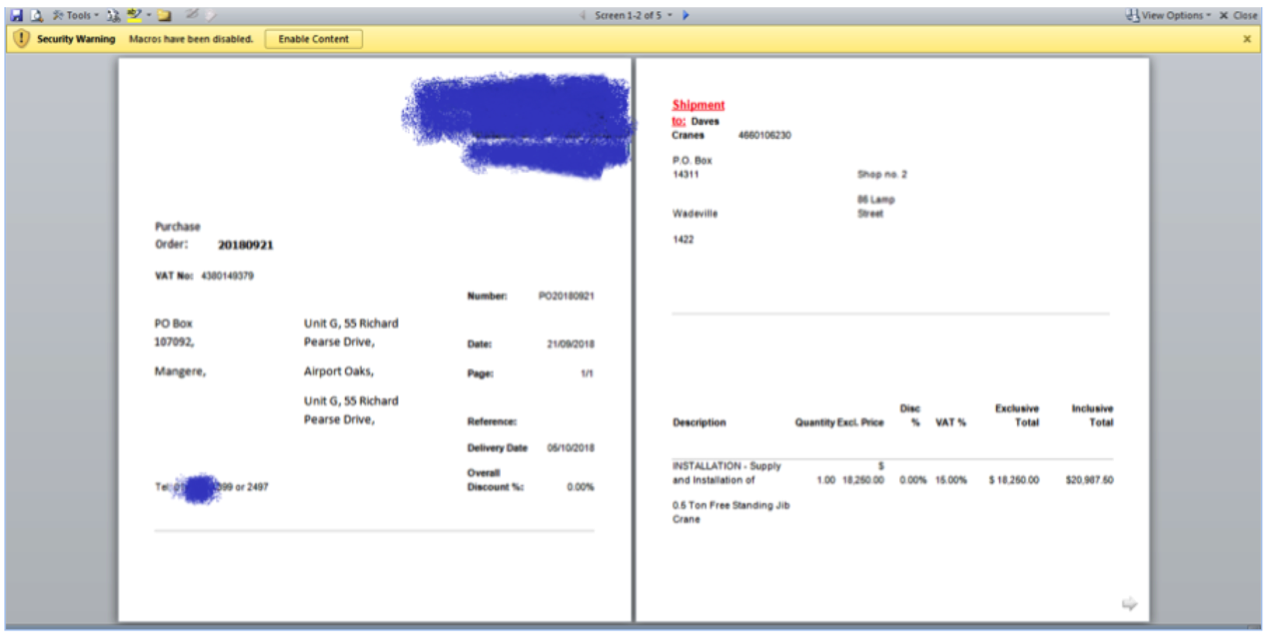
The name of the Word document being emailed to targets was called "eml_-_PO20180921.doc". When the document is opened we see the content shown in the above screenshot. As you can see, there is a warning message in yellow on the top of the window. Once the yellow button Enable Content is clicked by the victim the malicious VBA code is executed in the background and NanoCore RAT installed."
The point is that NanoCore RAT along with any other publicly available RAT are still very relevant today. The article above was dated in 2019 but trust me you're going to soon learn this still happens today! If you're upset you can't code your own RAT and you need to purchase one from a public source don't worry about it. As long as you deal with an active malware developer it's best to always have a relevant updated RAT and a good supplier for such weapons
Read the report below on malware trends for the first quarter of 2022. You can read the whole report of search the document for "Netwire".
NetWire was such a great tool loved and used by many. Bad news for you is like many things in life you're too late to the party because the creator of NetWire has been arrested.
When you're ready to upgrade your cache of cyber weapons then Cobalt Strike or Brute Ratel is what you want. These products are meant for "professionals" and they're not an entry level tool but should be considered when you're ready to take it to the next level. It's very easy to use but the cost is high but once you're able to generate money from your skills these products should be #1 on the list of things to buy.
https://www.cobaltstrike.com
https://bruteratel.com
You can find leaked versions at The Armory
Read how other actors are using Cobalt Strike in the wild against their targets.
If you don't want to purchase anything then the following tools could be used when following along with this course. Make sure Windows Defender is turned off or these tools will not function.
Metaspolit
PowerShell-Empire
Evil-OSX
PupyRAT
If you haven't heard of any of those tools then you should take a moment and check them out. There are plenty of tutorials on the Internet on how to set them up and use them so I won't even get into that shit. You'll need something to deliver when following this course. Since Macros are no longer a thing we're going to demonstrate the concept with a .zip file. Either way it's best to use these tools to understand a little more about malware. Ensure your Windows Defender and Anti-Virus (AV) are turned off because these public tools will be detected and prevent you from delivering the files to the target machine.
Remember, this course isn't about making your RAT/executable undetected but instead is designed around delivering your payloads through a malicious Word document.
In today's day and age sending an .exe to a target through email just isn't going to work. In fact, emailing any type of suspicious attachment isn't going to work at all. For example, Gmail blocks certain attachments as do most email providers and email clients. Below is the Gmail email attachment policy. Sending any of these attachments in an email will get them blocked and your intended target won't even get your bullshit email.
File types blocked in Gmail
There are a number of reasons why you may see the "This message was blocked because its content presents a potential security issue" error in Gmail. Gmail blocks messages that may spread viruses, like messages that include executable files or certain links.
Why messages get blocked
Messages that have attachments
To protect you against potential viruses and harmful software, Gmail doesn't allow you to attach certain types of files, including:
• Certain types of files, including their compressed form (like .gz or .bz2 files) or when found within archives (like .zip or .tgz files)
• Documents with malicious macros
• Password protected archives whose content is an archive
Note: If you try to attach a document that is too large, your message won't send. Learn more about attachments and file size limits.
Types you can't include as attachments
To protect your account, Gmail doesn't allow you to attach certain types of files. Gmail often updates the types of files not allowed to keep up with harmful software that is constantly changing. Some examples include:
.ADE, .ADP, .APK, .BAT, .CHM, .CMD, .COM, .CPL, .DLL, .DMG, .EXE, .HTA, .INS, .ISP, .JAR, .JS, .JSE, .LIB, .LNK, .MDE, .MSC, .MSI, .MSP, .MST, .NSH, .PIF, .SCR, .SCT, .SHB, .SYS, .VB, .VBE, .VBS, .VXD, .WSC, .WSF, .WSH, .CAB
What you can do
If you're sure the file is safe, you can ask the sender to upload the file to Google Drive. Then send it as a Drive attachment.
As you can see from the above Gmail attachment policy it's not that easy to send an executable disguised as something else anymore as those days are long gone. It's a good idea to apply the Gmail email attachment policy to all your targets when you're emailing and sending an attachment to them. Since we can't just send someone our malware evilness executable anymore we need to know how to get it onto a system or we're fucked. Something we'll be learning soon enough in ACT VII.
It's safe to say that Microsoft is dominating the marketplace with their products, specifically with Microsoft Office. Average people, organizations, companies, and students use Microsoft Office on the daily as their primary word processor so we know there are a lot of targets out there for us to focus on. You want to deliver a payload that is robust, versatile, flexible, and that can by-pass most AV applications, especially Windows Defender (RIP 2021).
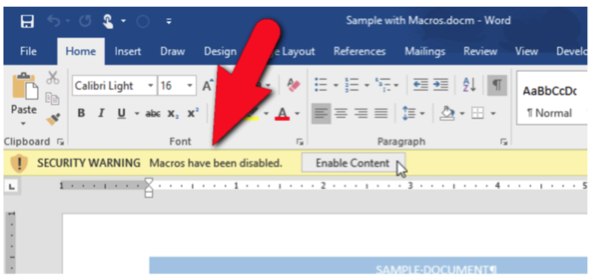
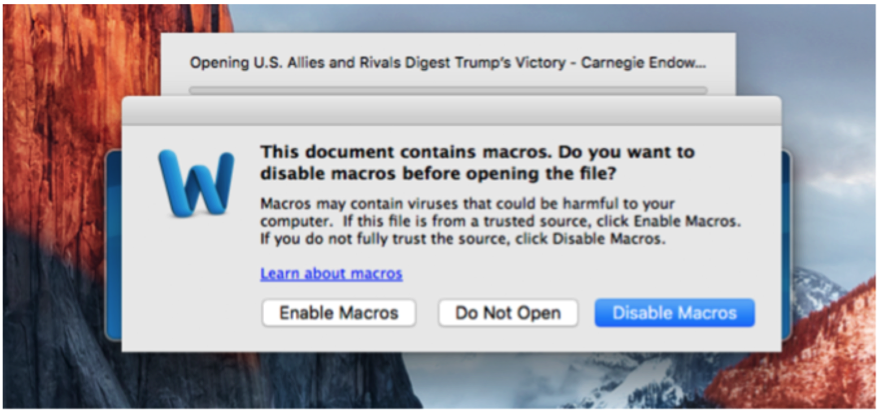
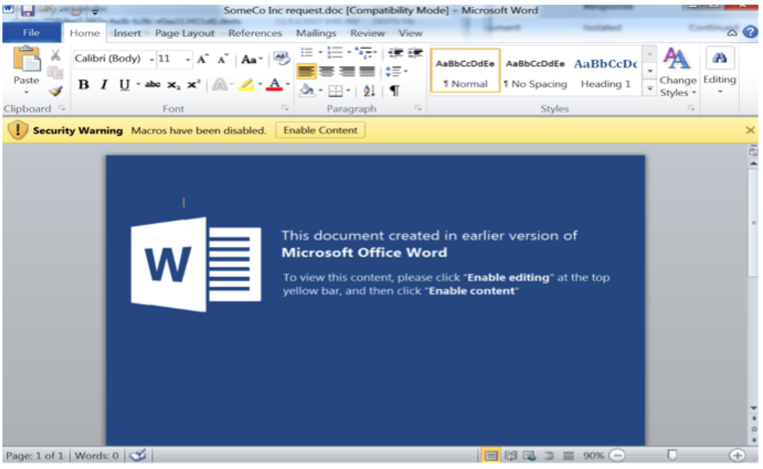
The key factor when it comes to using Microsoft documents as a delivery method for your malware are macros. The macros you’re able to create within a Word or Excel document are Visual Basic for Applications (VBA) code which are designed to execute code on the target machine once enabled by the user. When you open a Microsoft macro enabled Word document you'll be prompted with a yellow Security Warning toolbar advising that "Macros have been disabled" and a button to enable them. Windows and macOS display these warnings differently so if you're not familiar with how a Microsoft Word document with macros is displayed to a target please refer to the pictures below for Windows and macOS respectively.
Windows users that open a document with macros in it will be displayed the following:
For macOS users once they open the document they are presented a warning. They can either choose to Enable Macros, Disable Macros, or not open the file. By default, "Disable Macros" is selected and most users click through or hit Enter on their keyboard which will open the document without executing the macro. If that's the case we want to ensure our document is enticing enough for them to close the document and re-open it but this time enabling macros.
The trick when targeting Windows and macOS users is social engineering them into clicking on "Enable Content" or "Enable Macros" in order to execute the malicious macro. This can be done in a variety of ways but the most effective method is creating an email and document that is specifically designed for the target you're pursuing. Let's say you're targeting a group of people who are pro Jesus and you want to infiltrate that organization to cause some fuckery. You would craft the email in a way that would be pro Jesus lord of Muhammad and be appealing to the reader enticing them to download your Word document. You want to develop tactics that trick people into doing what you want to be done. IE: "Enable Content" or "Enable Macros".
For the rest of this course "Enable Content" will refer to both Windows and macOS macros for simplicity.
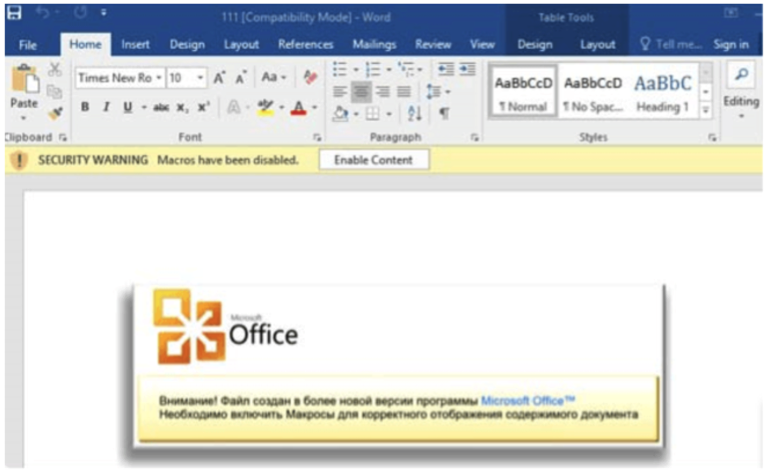
It is VERY important to design the Word document in a way that will entice your target(s) to open it and be motivated to click on "Enable Content". Thanks to malware researchers exposing government hacking campaigns we can learn from their techniques and tactics. The screenshots below are just some of the hacking tactics that are linked to the governments of the Russian, Chinese, Iranian, Israelis, and other intelligence agencies.
Take note on how they designed their Word documents to entice the end user to click on "Enable Content" in order to execute their malware.
Example 1:
Example 2:
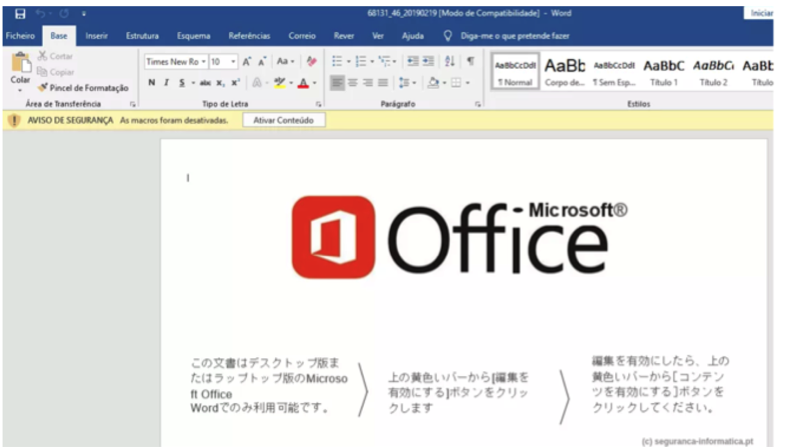
Example 3:
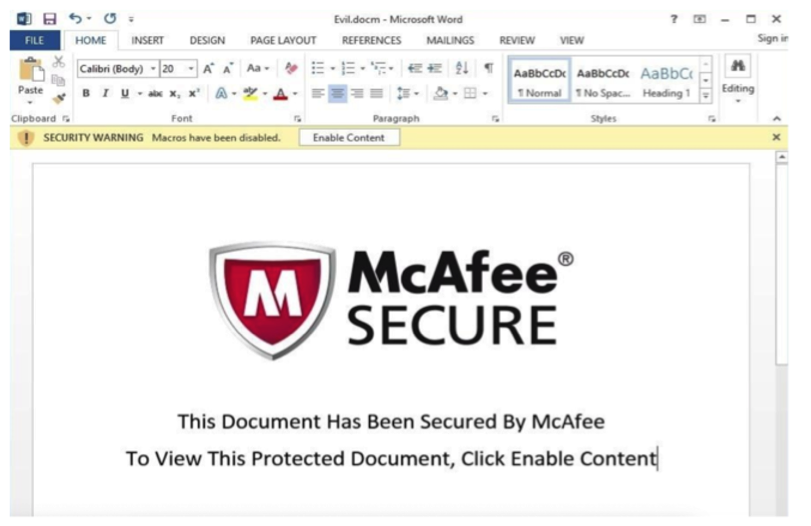
Example 4:
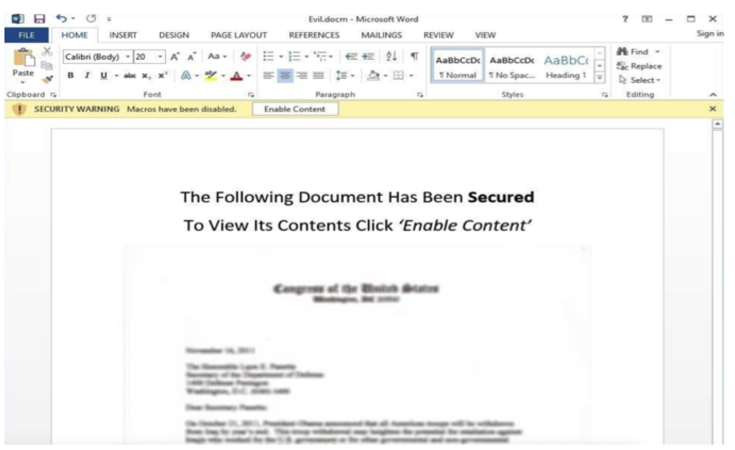
Example 5:
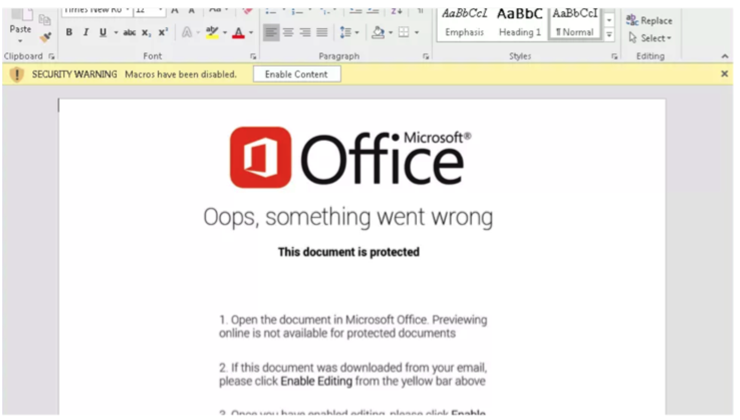
Example 6:
Those are just a few quick examples.
Professionally and cybercriminally speaking using a combination of examples 4-6 have the most effect on average users. Example #4 offers a blurred-out image of content that the user may be interested in viewing but must "Enable Content" to view it. This is a very good technique and I highly recommend blurring or fuzzing the document like example #4 so that the reader only has an idea of what the content might be. Make it specific for your target. Curiosity will get the best of people if you've created the email and document just right! If the document is something of interest to them then they would need to "Enable Content" in order to "view" the content.
By combining example #4 with examples #5 & #6 has the most success. Make it appealing to your target so they're able to relate the content to a Microsoft related product thus giving it more appeal to follow the directions to "Enable Content".
Read the Microsoft Threat Intelligence Center report below about malicious Word documents captured in the wild and go through each example to solidify this knowledge showing the importance of making the document appear as legitimate as possible. Making your document appear legitimate while enticing the user will give you the best chance of success in compromising them with your malware. Make everything look professional and craft the email properly toward the target of your interest!
It's important to note the email that contains the attached Word document is also the key to success. The email should always be crafted and directed to whom you're targeting and appear as legitimate as possible.
Remember, you want to target specific users that are of interest to you and that will give you some sort of personal or financial gain. Make and choose your own template when creating the Word document and modify it accordingly for each target you're after. For example, if you're targeting a dentist office then the email should be crafted in a way that would be inquiring about their services, insurance costs, appointments, etc. along with an attachment of your "dental records" which of course would be the malicious Word document. The point that I'm going to keep making is that the email you're sending should be crafted in a way that is tailored to whatever business and is enticing enough for them to open the attached Word document. Most employees don't take the same cyber security precautions when dealing with company computers and will try to open the file if it's related to their job. If their job is responding to new patients/clients then they'll want to help you and assist as needed. This is their job so capitalize on this and target companies and people accordingly.
Read below on some recent cybercriminals, governments, and other hacking groups activity. Take note on how they tailored their emails along with their payload delivery and malware execution. Ignore the technicalities if you're unable to understand them but just focus on the delivery of their malware, documents, and emails.
Note what type of files this group was sending and how .CHM are now known blocked files.
In the article below the group, most likely government related, targeting activists with malicious documents.
A common technique for some attackers is to deliver their malware in a ".zip" archive. As we've learned from the Gmail attachment policy a ".zip" file will be blocked so assume a low infection rate with this method as the email wouldn't even be delivered for them to open the attachments. You would need to entice your target(s) to click on your link and then download the .zip file to get around the email filters. Let them do you bidding!
Some things to check out.
Another example of highly sophisticated group methods and techniques.
Before Microsoft fixed the whole macro scene Microsoft Word disabled macros by default which gave the IT admins the ability to block macro execution across the corporate level. Targeting a corporation with malicious macros these days you should assume the IT admin has implemented a group policy for Microsoft Office against users being able to enable macros. If you really think about it why the fuck would most companies be using macros anyways?! Pick your targets wisely and properly! Does a dentist office have an IT team? Does a local plastic surgery clinic have an IT team? These types of businesses will have valuable data not meant to be stolen but meant to be targeted to ransomware off. Select your target properly for what your goals are and you will succeed!.
Go to the link below and cycle through each of the APTs on the left and read the synopsis on them to see what's happening in the current cyber warfare ecosystem. Take note of the malware delivery methods used.
Read through some APTs and check out all their methods to see what the professionals are up to.
This website is another excellent resource when keeping up with the cyberwar techniques and tradecraft. I cannot stress enough you want to copy other cybercriminal organizations and government hacker's techniques so you can modify them accordingly in order to deliver your malicious file. Learn from others but pursue your own goals. For the greater good or bad :)
As you've now learned most hackers, cyber criminals, and government hackers are using malicious Word documents in their cyber operations so they can deliver malware to their intended targets.
The point is, so can you. :)
Correction: The point is: You could've.

Take away points of this chapter:
- To Understand how other high-profile hackers are using these methods to compromise individuals around the world.
- To get you in the mind set of copying these groups and using their tactics and techniques towards targets of your own interests.