HackTown
Cyber Criminal University - Home

You are not logged in. You will only be able to access the courses in GREEN from the course list.
Chapter 7 - The sandbox party
Windows and macOS using Microsoft Office products are offer sandboxing and blocking of macros by default. Windows uses its own VM when sandboxing when enabled by the user and Microsoft now blocks the execution of macros by default.
The key take away points are that macros are disabled by default and every file that is launched by a macro will be placed in a sandboxed environment. You see? The macro infect other fuck show is over. Game is over bud if you asks me.
This chapter will focus on the macOS sandbox but the same principles can be applied to Windows users.

Everything in this chapter is meant for when someone is infected through a malicious Word Document. Do not forget that as you cannot replicate the examples in this chapter thanks to the latest OS updates!
Say it back to yourself. Everything in this chapter is designed for when you've infected someone via a malicious Word macro and the example code won't work for you.
I've simplified everything to act as if the Empire macro executed successfully using the examples in this chapter. Many of you may have issues getting the osx_macro to actually execute on your macOS so let's assume it did. Don't forget this and just learn!
OK so you've sent your malicious Word document to someone who uses a MacBook Pro, iMac, MacBook Air, etc. and have infected them. However, you now know that your malware will be restricted with its functionality and which directory you're sandboxed into.
Let's see what being sandboxed means. Since things have changed much since writing this course I had to re-write the examples away from demonstrating Empire on macOS through a Microsoft Word document. It really doesn't matter but I want you to read through this Chapter to understand more about the Microsoft Word sandbox more so than anything to do with Empire.
The examples below were designed for when a Word Document infected the macOS target with a Empire stager. Since things have changed much I still want you to visually see what I'm trying to show you so please just read and do not type any Empire syntax since this is just visual for you.
Below is an example of an infected macOS with Empire through a Microsoft Word macro document. Let's assume we've used the "usestager osx_macro" and executed it.
In my Kali VM Empire window I selected my Agent and typed:
shell touch /tmp/huh

In the screenshot above you can see I tried to make a file in the "/tmp" directory called "huh" but nothing happened after I entered the command. A file should have been created at /tmp/huh on the victim macOS computer but it wasn't. How odd? Let's figure out what the fuck is happening here. Microsoft Word on macOS has sandboxed our malware and has caught the file which is restricting you.
Open Terminal.app on your macOS and type:
codesign -v --display --entitlements - /Applications/Microsoft\ Word.app
This assumes you have Microsoft Word on your machine which you should or what the fuck dude?
This will display a bunch of request entitlements which allows Microsoft Word to access files, address book, and other details on your macOS.
After you've ran the command above take note near the end of that command output like the screenshot below.

Interestingly enough the Microsoft Word process allows read/write to a file as long as it contains the following characters #"(^|/)~\$[^/]+$". The curious one I found was the "~". Most of us should know that when you're on a macOS or Linux computer the "~" character is the symbol for the HOME directory so this might prove useful if we can leverage it since you cannot write or read in any other location. Weird that "~" is even there right?
A security researcher found:
"For example ~$document1.docx is the typical filename format for temporary files used by Office, so what this rule is doing is allowing the process to persist temporary files without prompting the user for permission each time. At this point alarm bells should be ringing, as although this rule allows Word to create a temporary file, it also allows us to create a file anywhere on the file system as long as it ends with “~$something”."
Getting back to our original sandboxed Empire agent we now can attempt to create a file with the "~" character in it to see what's what. With the information we just learned we can see that we are no longer greeted with the “Operation Not Permitted” error as we were before.
On your Kali VM in the Empire window select your Agent and enter "touch /tmp/~$aaa.txt" in the Shell Command prompt and click "Run".
Go into the /tmp directory and you'll see the "~.txt" file has been created which has gotten around the sandbox directory. However, this doesn't really help us as we're still in a sandbox environment and writing any type of file with those characters doesn't really assist us in getting out of the sandbox and doing anything useful with our infected macOS target. I mean sure you can write a file outside of the sandbox but we still cannot execute that file so we're still trapped. Unless your goal is to write a fuck ton of files to the /tmp directory but not execute them then fuck your golden pony boy.
Remember you're restricted to the directory of:
"/Users/YOUR-USERNAME/Library/Containers/com.microsoft.Word/Data"
This sandbox puts limitations on the ability to utilize the socket library and many other libraries thus restricting Empire and similar tools delivered with macro payload delivery methods. This is why the Word document can download your file but not execute it since it cannot connect back. Any file you're trying to write without using the regex talked about ( #"(^|/)~\$[^/]+$" ) is sandboxed to this directory and restricted. Most functions of Empire and anything else simply don't work.

Also, you'll notice from the screenshot above that you're forbidden in writing anything to the directories of "/Library/Applications\ Scripts" and "/Library/LaunchAgents". Launch agents and daemons are very similar. The main difference between them is that agents are loaded upon user login where daemons are loaded at system startup.
These directories launch programs and scripts automatically based on the .plist file setup at the user and system levels. A .plist file is simply a file that points to the location of whatever program/script you want executed. This is beyond the scope of the guide but just understand that these folders hold items that will launch when the computer starts up or when a user logs on automatically. If you're already familiar with the start-up folders of Windows then you know the Windows Startup directories and can consider "/Library/Applications\ Scripts" and "/Library/LaunchAgents" the "C:\Users\Username\AppData\Roaming\Microsoft\Windows\Start Menu\Programs\Startup" directory but for macOS.
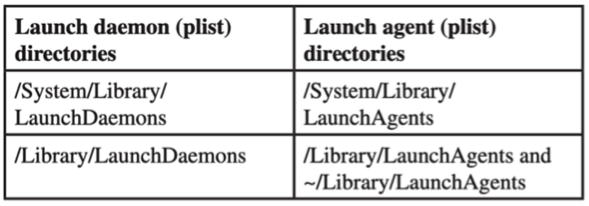
Not being able to write to "/Library/Applications\ Scripts" and "/Library/LaunchAgents" makes sense from a security perspective because this will prevent anyone from writing a start-up file in those locations. If this wasn't the case we would slowly build a .plist file in the users start-up folder and simply wait for the user to log off, or force them to logoff, and then our code will be executed outside of the sandbox. I'm repeating myself but it's important to understand this shit and that infecting macOS users with malicious Word documents will be stuck in a sandbox.
Whichever payload you're delivering to a macOS target through a Microsoft Word document will be sandboxed which limits the functionality of any commercial RAT, private RAT, Empire, etc. Maybe you're able to access the target machine, to some degree, but will never maintain persistence nor execute any useful commands that would be of benefit for you. This is the current state of macOS malware delivered by a Microsoft Word document as the delivery method. Unless you have a macOS privilege escalation 0-day or a private bypass technique this is life but I'm sure some eager security researcher will post something on Twitter soon enough so no need to fucking worry.
That all being said after doing some heavy research and finding a method around the sandbox (contact if you want to buy method) you can do some things. For example, we know that macro Word document sandbox restricts you to the directory of:
"/Users/YOUR-USERNAME/Library/Containers/com.microsoft.Word/Data"
Since we know we can use ( #"(^|/)~\$[^/]+$" ) for certain files we can begin to see how we might bypass this sandbox circle jerk.
On your Kali VM in the Empire window select your Agent and enter into the Shell Command box:
touch /Users/YOUR-USERNAME/Library/~$test
You'll notice this isn't allowed.
We know that 'cd ..' brings us back a directory and '../' on web applications moves down a directory. Using this knowledge, we can begin to see what works. Let's try to see if other methods work.
touch '../../../~$test'
Interestingly enough this method works letting us write to
'/Users/YOUR-USERNAME/Library/~$test'
We'll leave it at that. In the past I offered a macOS work around but this is no longer an option. However, bypasses come and go so keep your eye peeled for one!
Take away points from this chapter:
- Understanding the limitations of malware being delivered by a malicious Microsoft Word document.
- Knowing what directory you're confined to from macOS sandbox.
- Using Empire to understand the sandboxing restrictions.