HackTown
Cyber Criminal University - Home

You are not logged in. You will only be able to access the courses in GREEN from the course list.
Chapter 6 - Increase the POWER!
Another technique to increase your chances of success when hacking a Wi-Fi network is to increasing the transmitting power of the Alfa network card to juice it the fuck up. When launching Wi-Fi network attacks it's best to be the closet and strongest signal to the target you're attacking. Depending on which Alfa network card you have this chapter may or may not be beneficial for you. Don't flip your shit if it's not as every card will respond differently.
Most Alfa network cards are capable of generating 1 WATT of power to increase the range of the Wi-Fi network card but by default are not setup to do so in Kali. We can tweak this shit by setting the transmitting power of the card to its max and boost our signal for best connection! Some people might have Alfa network cards that are capable of this and others do not depending on the one you purchased. If you get an error along the way, then you do not ;)

The newest version of Kali creates issues with certain Alfa network cards that this worked fine in the past. Some of you may have issues with increasing the power of the Alfa network card.
In Kali open up Terminal and type:
sudo iw reg set GY
This command will set the region of your Kali machine to Guyana. Each country allows specific Wi-Fi regulations and by setting our OS host country to "GY (Guyana)" will allow us to increase the power beyond what is allowed in other countries. Certain countries don't want you to operate on certain channels whereas others do not have strict guidelines. By setting the country of our machine allows us to set different settings accordingly.
sudo ifconfig
Find your wireless card interface.
sudo ifconfig INTERFACE down
sudo iwconfig INTERFACE
Look for "Tx-Power=" and you'll see the default transmitting power. We want to increase this!
sudo iwconfig INTERFACE txpower 30
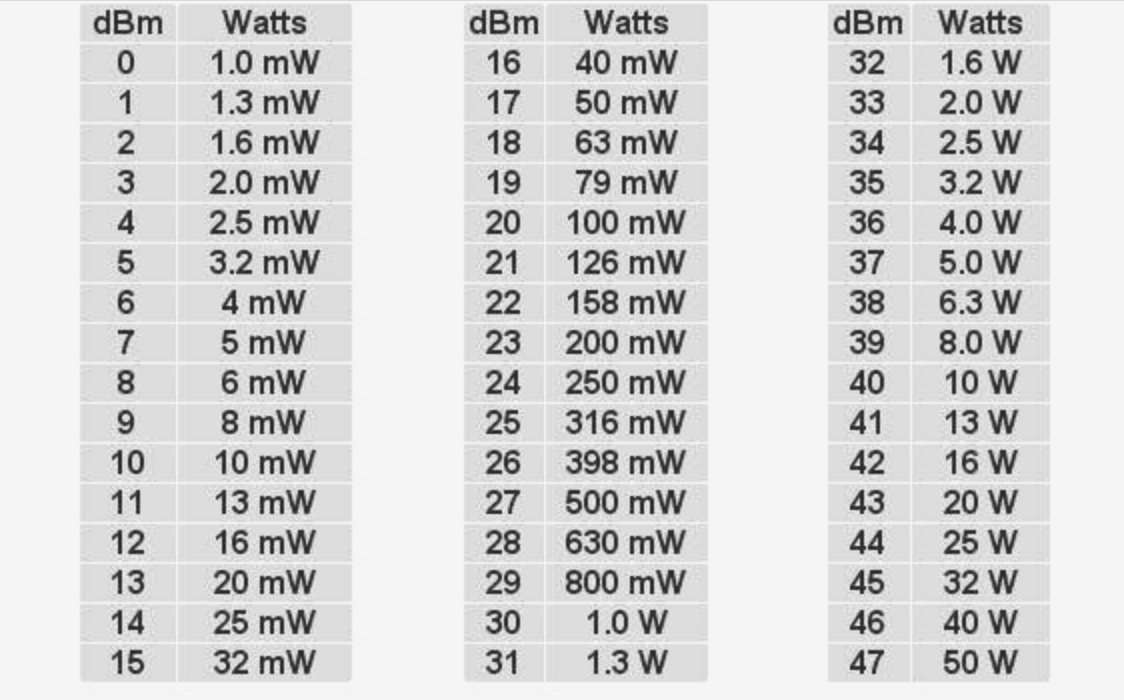
This will set the max power to 1W if your network is capable of this.
sudo iwconfig INTERFACE
Check again to see the difference with "Tx-Power=".
sudo ifconfig INTERFACE up
Bring the interface back up.
The power of your Wi-Fi network card plays an important role in maintaining and improving the signal strength of that Wi-Fi card. The power is typically measured in dBm or watts. The gain provided by increasing power is only a "one way street" which means increasing the power of your Wi-Fi card will only improve transmission strength and not its receiving strength.
You'll notice in the screenshot below my Alfa network card by default is set to a power level of "Tx-Power=20 dBm" which is not that network cards full potential.
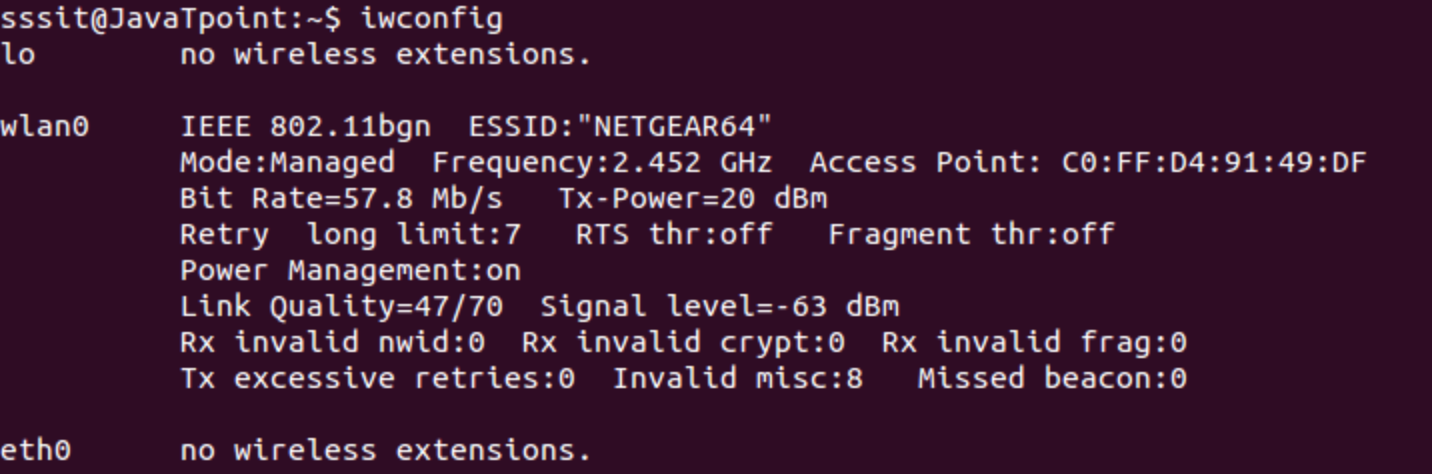
By running the command "sudo iwconfig INTERFACE txpower 30" it will increase the power level to 1Watt which is the max for my specific Alfa network card. Below is the conversion chart so you fully understand what you're doing by increasing the power level to 1W and what the number with dBm means.
Now that you've increased the power you'll be transmitting as the most powerful signal the Alfa network card can produce. The downfall to increasing the transmitting power is you'll wear down your Alfa network card quicker than usual as it will generate more heat and energy. Personally, I found using it quite a bit after 2-3 years of owning one it would still function for my needs but not be as reliable as it once was (would disconnect randomly, drop connection, overheat, etc.).
Usually, when someone has already connected to a Wi-Fi network their computer will prefer the wireless network with the strongest signal as long as it has previously connected to that SSID. Therefore, if we can identify other networks that the person is probing for and we can provide a better signal we might be able to get them to connect to your AP which is important when launching EvilTwin attacks.